In the world of AI, there’s a fascinating realm called prompt engineering. It’s all about crafting questions that bring out the best in language models, shaping how we interact with them. Today, let’s dive into prompt engineering, discovering its secrets, tips, and tricks to unlock the full potential of ChatGPT.
Introduction: The Essence of Prompt Engineering
Prompt engineering goes beyond making prompts; it’s about grasping the subtleties of language models like ChatGPT and using that understanding to get the results you want. It’s like unlocking the superpowers of these models, making them even better, and shaping the future of human-computer interaction.
Crafting Effective Prompts:
Prompt engineering is all about creating clear and specific prompts. These prompts not only help the model understand better but also get more useful responses. Let’s dig into some examples to see how it works:
Vague Prompt: “How should I prepare for a job interview?”
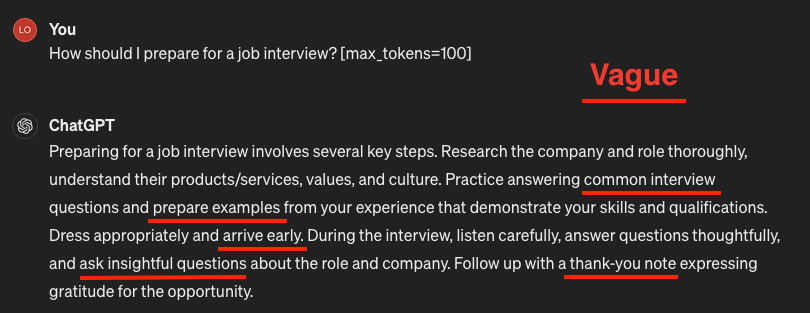
Effective Prompt: “I am a Data Analyst with 6 years of experience in this domain. I’m actively looking for a job in this field. How should I prepare for a job interview?”
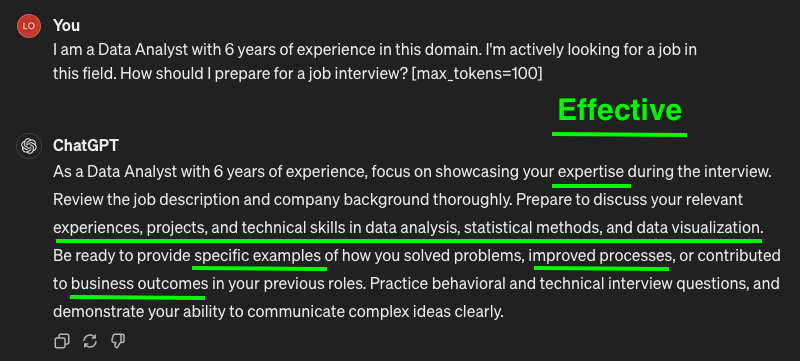
By providing context and direction, we pave the way for more meaningful interactions with ChatGPT, resulting in responses tailored to our needs.
Fine-Tuning Parameters: The Magic Knobs
The magic of prompt engineering lies in fine-tuning parameters to sculpt the output of ChatGPT. With ChatGPT, we can adjust different settings to make the responses more helpful or creative.
In the ChatGPT web interface, you can fine-tune your prompts by adding parameters directly within square brackets [ ] at the end of your prompt. Each parameter is separated by a space. Here’s the general syntax you can use:
[parameter_name=value]
For example, if you want to adjust the temperature parameter to 0.7, your prompt with the parameter would look like this:
Tell me a story about space [temperature=0.7]
You can also include multiple parameters in the same prompt by separating them with spaces. Here’s an example with multiple parameters:
What's your favorite movie? [temperature=0.8 max_tokens=50 top_p=0.7]
In this example, we’ve adjusted the temperature, max tokens, and top p parameters all in one prompt.
Remember to replace “parameter_name” with the name of the parameter you want to adjust and “value” with the desired value for that parameter.
Here are some common parameters you can use:
Here’s a closer look at some of these settings:
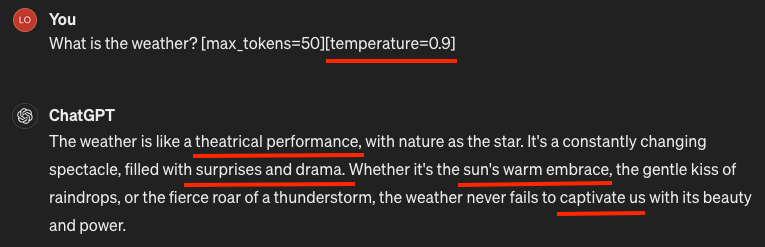
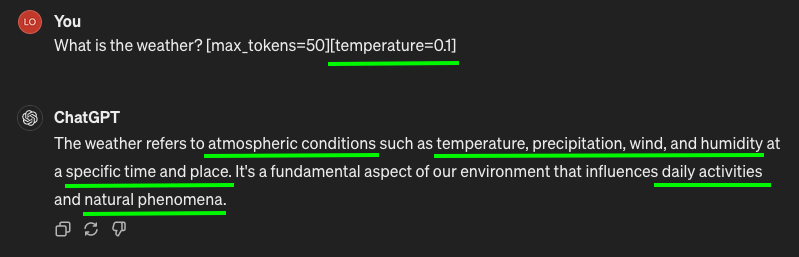
Temperature: Adjusts the randomness of responses, balancing between creativity and coherence.
- Low values yield more deterministic responses, ideal for factual queries.
- High values encourage creativity, fostering diverse outputs.
For tasks like extracting data and providing factual answers to questions, a temperature setting of 0 is optimal.
Max Tokens: Sets the maximum length of the response.
Just like setting a word limit for a school essay, we can tell ChatGPT how long we want the response to be. It helps keep things short and sweet, so we don’t get overwhelmed with a long answer.
Syntax: [max_tokens=100]
Top P: Controls the diversity of responses by considering only the most likely tokens.
This is like choosing which toppings to put on a pizza. With a low Top P, ChatGPT picks the most popular toppings (words), so the response is more predictable. But with a higher Top P, it’s like adding more toppings for variety – ChatGPT considers more options and gives us diverse responses.
NOTE: It’s generally advised to adjust either temperature or Top P, but not both simultaneously.
Syntax: [top_p=0.8]
Frequency Penalty: Encourages varied outputs by penalizing repeated tokens.
This feature lowers the chance of a word repeating in the model’s responses by penalizing tokens that show up often in both the response and prompt. If you increase the frequency penalty, you make it less likely for words to repeat. So, by giving a bigger penalty to words that pop up a lot, this setting helps cut down on word repetition in what the model says.
Syntax: [frequency_penalty=0.5]
Presence Penalty: Penalizes generating the same token multiple times, fostering diversity.
Unlike the frequency penalty, this one always gives the same penalty for repeated words, no matter how many times they show up. Whether a word appears twice or ten times, it gets the same punishment. This helps the model not say the same thing too many times. If you want the model to come up with different or imaginative text, you might want to use a higher presence penalty. But if you want it to stay more focused, go for a lower presence penalty.
NOTE: Similar to temperature and top_p, it’s generally advisable to adjust either the frequency or presence penalty, but not both simultaneously.
Syntax: [presence_penalty=0.5]
Stop Sequence: Signals the model to stop generating further output when a specific sequence is reached.
These are strings that make the model stop generating tokens. When you specify stop sequences, you’re giving the model another way to control how long and how structured its response is. For example, you can tell the model to make lists with only up to 10 items by using “11” as a stop sequence.
Syntax: [stop_sequence=""]

Best Of: Generates multiple responses and returns the best one based on scoring.
For example, if you set [best_of] to 5, the model generates 5 candidate responses for each prompt. It then evaluates the quality of these responses and updates its parameters based on which responses are deemed the “best” according to the specified evaluation metric (such as accuracy, relevance, coherence, etc.).
Syntax: [best_of=3]
Echo: Echoes back the prompt in the response, allowing the model to build upon it.
When crafting prompts for ChatGPT, you typically provide some initial context or information to guide the model in generating a relevant response. The [Echo] parameter allows you to specify whether and how much of this initial context should be echoed or repeated in the generated response.
For example, setting [Echo] to true instructs the model to include a significant portion of the input prompt in the generated response, effectively echoing the input back to some extent. This can be useful when you want the model’s response to closely follow or reference the input context.
Conversely, setting [Echo] to false or a lower value instructs the model to generate a response that diverges more from the input prompt, potentially resulting in more creative or varied outputs. This approach can be beneficial when you want the model to generate responses that are less constrained by the input context.
Syntax: [echo=true]
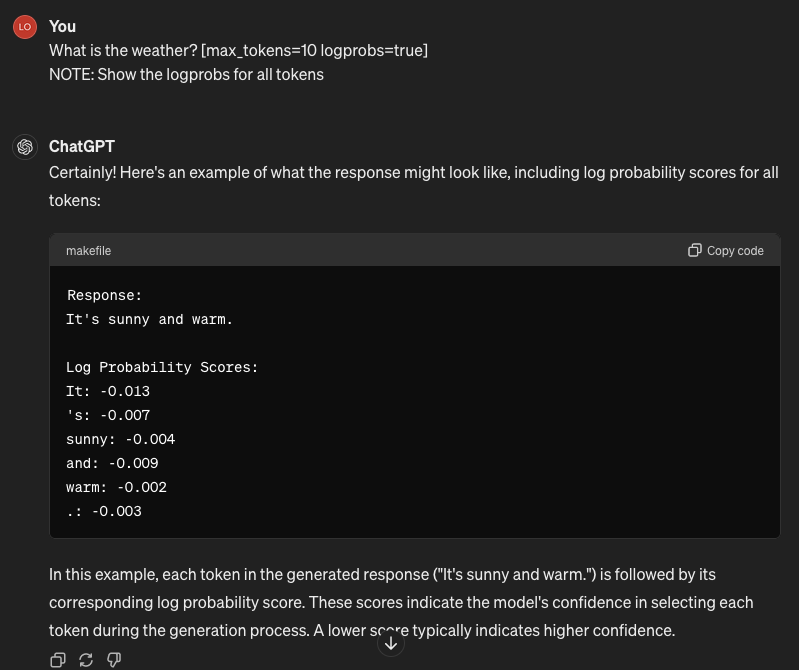
Logprobs: Provides insight into the model’s decision-making process by returning log probabilities for each token.
By analyzing the log probability scores provided by [logprobs], you can gain insights into how confident the model is about each token in the generated response. This information can be useful for various purposes, such as:
- Response analysis: You can examine the log probability scores to understand which parts of the generated response the model is more confident about and which parts it is less certain about. This can help in assessing the coherence and relevance of the generated text.
- Error detection: Unusually low log probability scores for certain tokens may indicate potential errors or inconsistencies in the generated response. By monitoring these scores, you can identify areas where the model may be struggling or where manual intervention may be necessary.
- Fine-tuning: When fine-tuning the model on specific tasks or datasets, you can use
[logprobs]to gather additional information about the model’s behavior and performance. This information can inform your fine-tuning strategies and help improve the model’s accuracy and effectiveness for the target task.
Syntax: [logprobs=true]
Conclusion
In this article, we’ve discussed some great tips, cool tricks, and hidden gems for making the most out of ChatGPT prompts. By crafting effective prompts, exploring advanced techniques, and leveraging lesser-known features, you can maximize the impact of ChatGPT and create compelling user experiences. Whether you’re improving customer support, writing content, or boosting engagement, ChatGPT can really make a difference. So, play around with different approaches, tweak settings, and adjust the model to fit what you need.
 Academic Brain Solutions
Leave a comment